
User Tools
fork_synthetic_data_generator
This is an old revision of the document!
Table of Contents
Fork Synthetic Data Generator
Linux Development Environment
Set Up
- Cloned fork;
- Installed Qt5.4.0 from download.qt.io.
- Ran
qtchooser -install qt5.4.0 /opt/Qt5.4.0/5.4/gcc_64/bin/qmaketo make installed Qt version available. - Added line
export QT_SELECT=“qt5.4.0”to~/.bashrcto pick correct Qt version at launch. - Installed
qtbase5-devto fix “Missing Qt5Core”-error during compilation. - Installed
qtdeclarative5-devto fix “Missing QtQuick”-error during compilation. - Installed
qml-module-qtquick-layouts qml-module-qtquick-dialogs qml-module-qtquick-controls qml-module-qt-labs-settings qml-module-qtmultimediato fix “missing qml module”-errors during execution. - Installed
libgl1-mesa-swx11to fix “LLVM ERROR: Cannot select: intrinsic %llvm.x86.sse41.pblendvb”-error during execution.
Usage
- Connect using
ssh -X <username>@<hostname>
  - Switch to directory with scripts
cd ~/Dekstop/mpvsynthdatafork/MultivariateProjectionViewer/tools- Run./xShell_Build.shto compile the project. - Run./xShell_Start.shto run the executable. - Runexitto close connection. ==== Current Issues ==== Relevant threads for current errors: * https://forum.qt.io/topic/81112/qt-won-t-start-via-remote-desktop/2 * https://forum.qt.io/topic/24315/qt-5-0-1-failed-to-initialize-xrandr * https://github.com/spyder-ide/spyder/issues/3713 * https://github.com/YuvalNirkin/face_swap/issues/25 * https://serverfault.com/questions/788503/xrandr-error-when-accessing-debian-vm-over-vnc * https://sourceforge.net/p/turbovnc/mailman/message/33087882/ * https://serverfault.com/questions/788503/xrandr-error-when-accessing-debian-vm-over-vnc * https://bugreports.qt.io/browse/QTBUG-33319 * https://support.rstudio.com/hc/en-us/community/posts/207987538-RStudio-simply-will-not-work-through-a-remote-connection ===== User Tutorial ===== tutorial.odt tutorial_images.tar.gz ===== Code Structure ===== ==== Overview ====itemforModuleSyntheticMultidimensionalDataGeneratorID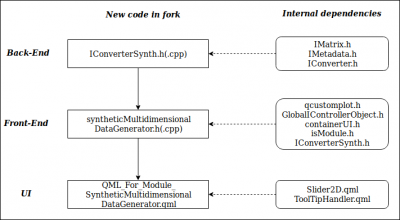 ==== Details ====
QML_For_Module_SyntheticMultidimensionalDataGenerator.qml
Layout (
==== Details ====
QML_For_Module_SyntheticMultidimensionalDataGenerator.qml
Layout () consists of 2 main parts: menu that provides overview of available tools and visualization area where a scatter plot of the dataset is displayed. - Menu (recMenu): this part of the layout consists of another 3 sub-areas: (recDimensionalitySwitch) that contains an element that allows to switch between plot dimensionalities (2d/3d); (recMenuTools) that contains a number of icons that call certain functions or set the interaction mode and determine how a mouse will work; (recMenuToolsOptions) if a certain tool requires some additional parameters to be specified, they will appear in this area (e.g. magnet's power, stroke's size etc) - Visualization area (recVisualizationArea): large area in the right and middle part of the screen is used to display a scatter plot of selected dimensions of the generated dataset. IUI/syntheticMultidimensionalDataGenerator.h(.cpp) Module to synthetic data generation that supports (1) generation/import, (2) visualization, (3) modification, and (4) export of dataset. - Generation/import: dataset is generated ingenerateDataset()that fills IMatrix object with uniform distributed random numbers. WhenupdateModule()is called and an existing dataset was imported,importDataset()method is called, which converts OriginalDataset obtained from import to the internal representation of dataset, namely IMatrix object and converts IMetadata to a number of vectors which contain individual metadata attributes for all dimensions. - Visualization: dataset is visualized using QPainter functionality combined with QCustomPlot. In 2-dimensional plot, QCustomPlot is used to visualize and update x- and y-axis, scales and grid. The 2D-plot consists of 4 layers: Axis-Grid Layer, Dataset Layer, Selection Layer, and Interaction Layer. Each layer is represented by QPixmap and updated when mVisualizationMode is set to a respective value. Each layer is updated separately to reduce the total plotting and update time. Each layer is updated inupdate[Name]Layer()-method. 3-dimensional plot is implemented using purely QPainter-functionality. All models (axis, cubes, planes, datapoints) are 3D-objects, which are then projected onto xy-plane and rendered according to the z-value. This plot consists of a single layer in order to easily determine the rendering order in one place. - Modification of the dataset: dataset modifications happen when mouse events are triggered:mousePressEvent,mouseMoveEvent,mouseReleaseEvent,wheelEvent. General idea: onmousePressEvent, required interaction parameters are initialized (e.g. magnet's center, starting point of the translation etc). OnmouseMoveEvent, these parameters (e.g. magnet's center is moved, selection rectangle is being drawn) and dataset itself are updated (e.g. on drag'n'drop, all selected points are moved using translation vector). OnmouseReleaseEvent, parameters are set to default, and dataset is updated for the final time. Corresponding scatter plot is updated 50 times per second, following the strategy: onmousePressEvent, a timer is started which is triggered 50 times a second. On timeout(),update()method of the module, inherited from QQuickPaintedItem is called. OnmouseReleaseEvent, timer is stopped and connection to update()-method is closed. - Export: inexportDataset()an empty IMetadata object is created and filled with relevant data for all dimensions. This object, as well as dataset in form of IMatrix is passed toIConverterSynth::convert()method which converts these two input parameters to the suitable dataset representation. IFile/IConverterSynth.h(.cpp) This class extendsconvert()'' method which now takes IMetadata and IMatrix object as input and saves these object in correct representation (dataset is stored as .data file, metadata is stored as .data.json).

For more details, refer to in-code documentation.
Icon Credits
- change_class_*_icon: Icon made by Freepik from www.flaticon.com
- choose_dimension_*_icon: Icon made by Smashicons from www.flaticon.com
- dataset_details_*_icon: Icon made by Freepik from www.flaticon.com
- drag_n_drop_*_icon: Icon made by Pixel perfect from www.flaticon.com
- exploration_tool_*_icon: Icon made by Pixel Buddha from www.flaticon.com
- export_dataset_*_icon: Icon made by Smashicons from www.flaticon.com
- generate_dataset_icon:Icon made by Smashicons from www.flaticon.com
- information_icon: Icon made by Smashicons from www.flaticon.com
- magnet_*_icon: Icon made by Smashicons from www.flaticon.com
- strokes_*_icon: Icon made by Smashicons from www.flaticon.com
- switch_*: Icon made by Smashicons from www.flaticon.com
- tool_options_*: Icon made by Gregor Cresnar from www.flaticon.com
- tools_icon: Icon made by Smashicons from www.flaticon.com
fork_synthetic_data_generator.1543581473.txt.gz · Last modified: 2018/11/30 13:37 by 141.44.167.140


